This isn't a people problem. It's a process problem — and it compounds as you grow.
Research from the Center for Effective Organizations found that back-office professionals spend 73.2% of their time on administrative tasks rather than strategic work. For mid-market companies running lean teams, that's not just inefficient — it's a ceiling on how fast you can scale.
This article covers which back-office functions benefit most from AI and automation, what the measurable business case looks like, and how mid-market companies can get started without an enterprise-level budget.
Key Takeaways
- AI and automation eliminate most manual, rule-based back-office tasks across finance, HR, compliance, and procurement
- Results are tangible — lower costs, fewer errors, faster cycle times, and headcount-independent growth
- Low/no-code tools make automation accessible without a large IT team or enterprise-level budget
- The AI-Enabled, Human-Led approach works best: automation handles repetitive execution while people handle judgment, exceptions, and strategy
- Start with a process audit to find your highest-friction workflows — don't try to automate everything at once
What Is Back-Office Automation — and Why Does It Matter Now?
Back-office automation is the use of AI, robotic process automation (RPA), and workflow tools to handle rule-based administrative tasks that traditionally consume significant human time — covering finance, HR, compliance, procurement, and reporting.
The urgency for mid-market companies is specific. Unlike large enterprises with dedicated operations teams, mid-market companies run lean. The manual workload falls on employees who should be focused on growth. Companies lose an estimated 4–5% of annual revenue to administrative overhead that could be reduced or eliminated through automation.
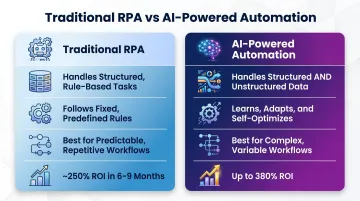
Traditional RPA vs. AI-Powered Automation
The two are fundamentally different — and which one you deploy determines how much of your back-office you can actually automate:
| Traditional RPA | AI-Powered Automation | |
|---|---|---|
| Handles | Structured, rule-based tasks | Structured + unstructured data |
| Adaptability | Follows fixed rules | Learns from data, handles exceptions |
| Best for | High-volume, predictable workflows | Complex workflows with variability |
| ROI | ~250% within 6–9 months | Up to 380% (Put It Forward, 2025) |
Traditional RPA follows scripts. AI-powered automation can read an unformatted invoice, identify an exception, and route it appropriately — without a human touching it. For mid-market teams running lean, that means automating not just the predictable tasks, but the messy, exception-heavy ones that currently land back on someone's desk.
Where AI Makes the Biggest Impact in Back-Office Operations
Accounts Payable and Financial Operations
AP is where automation ROI shows up fastest. Manual invoice processing costs organizations an average of $10.18 per invoice — best-in-class automated teams bring that down to $3.12, according to Ardent Partners. Top-performing teams using automation reach $2.07 per invoice.
The time savings are equally stark:
- Manual processing: 10–15 minutes per invoice, roughly 5–6 per hour
- Automated processing: under 2 minutes, over 30 per hour
- FTE productivity: invoices per day jumps from 20.17 to 74.24 — a 268% increase
Beyond invoices, automated reconciliation and real-time financial reporting give leadership current visibility into cash flow instead of waiting for month-end. ISG data shows automation delivers a 30–50% reduction in financial close cycle time. For companies where close consumes half the finance team's month, that time compounds quickly across a year.
HR, Onboarding, and Employee Lifecycle Management
Manual onboarding costs approximately $4,000 per hire and consumes 10–20 hours of HR staff time. Automation changes that equation by handling:
- Document routing and e-signature collection
- System access provisioning across IT tools
- Training assignment triggers
- Benefits enrollment reminders and deadline tracking
HR teams that automate these steps shift their time from coordination to the work that actually drives retention and culture. SHRM reports HR automations have risen 599% over two years, with AI adoption in HR jumping from 26% to 43% in a single year — the pressure to modernize is real.
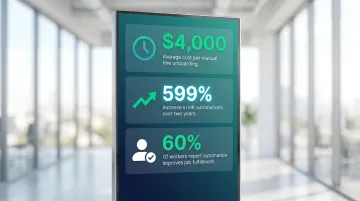
The connection to retention is direct. A UiPath survey of 6,460 workers found that nearly 60% believe automation improves job fulfillment, and 58% say it addresses workplace burnout.
Global Mobility and Compliance Tracking
Global mobility is one of the highest-stakes, most documentation-intensive back-office functions. A single case can require 40 to 50 distinct documents for full regulatory compliance (OECD data), and 55% of mobility teams report struggling to manage the scale of data and documentation required, per KPMG's 2025 Global Mobility Benchmarking Report.
Missing a single deadline — a work permit renewal, a tax filing, an immigration document — can result in permit loss or significant financial penalties. The exposure is operational and financial, not just administrative.
AI-powered tools automate compliance tracking, document collection, policy application, and deadline management across jurisdictions. Approximately 40% of organizations are now prioritizing global mobility process automation specifically to reduce compliance exposure.
Eisemann Consulting applies automation to compliance workflows within broader mobility program management — directly addressing the deadline sensitivity and documentation volume that create the most risk.
Procurement and Vendor Management
Procurement bottlenecks are often invisible until they cause a delay. Automation addresses the most common friction points:
- Purchase order generation from approved requisitions
- Vendor onboarding document collection and routing
- Multi-tier approval workflows with automatic escalation
- Policy compliance checks before spend is committed
Approvals move faster, policy gaps close, and procurement teams spend less time chasing signatures.
Reporting, Analytics, and Data Management
Manual reporting is one of the clearest targets for automation. When data lives across five systems and someone has to pull, format, and reconcile it into a spreadsheet every week, the report is already stale by the time leadership sees it.
AI consolidates data from disconnected systems into real-time dashboards and predictive reports — so operations leaders spend less time assembling numbers and more time responding to them.
The Business Case: What Automation Actually Delivers
Cost Reduction
Deloitte's Global Intelligent Automation Survey (660 respondents across 26 countries) found organizations achieved an average realized cost reduction of 24%, with an expected 31% over the following three years. AI+RPA integration specifically reduces labor costs 25–40%.
For mid-market companies managing lean teams, these aren't marginal gains — they're the difference between scaling with the same headcount or hiring a new team member every time volume increases.
Accuracy Improvement
Cost savings get the headlines, but accuracy is where automation earns its keep daily. Manual AP error rates run at approximately 2%. Automation drives that below 0.8% (IOFM data). For a company processing thousands of invoices monthly, that's a meaningful reduction in rework, vendor disputes, and duplicate payments.
IBM estimates the cost of a single lost or corrupted record at $148. Accuracy isn't just a quality metric — it has a direct dollar value.
Scalability Without Headcount Growth
For growing companies, this is where automation changes the math entirely. When volume doubles — more invoices, more hires, more vendor contracts — automation absorbs the load without adding headcount. Better processes replace additional staff.
Deloitte's 2022 survey reported a realized productivity increase of 27%, with a target of 34%. AI+RPA systems increase productivity 4–5x compared to manual processes.
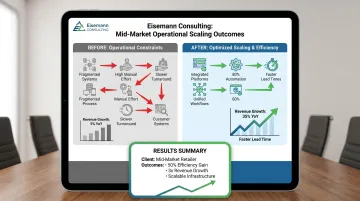
Eisemann Consulting has documented similar results: one mid-market e-commerce client achieved 3x revenue growth with the same operational headcount by redesigning core workflows and implementing an integrated tech stack.
Faster Cycle Times
When approvals, data entry, and reporting are automated:
- Invoice processing drops from 10.9 days to 3.7 days (Ardent Partners)
- Financial close compresses by 30–50%
- Onboarding workflows that took weeks complete in days
Faster cycle times have a direct impact on vendor relationships, cash flow, and compliance deadlines. Leadership stops waiting for month-end reports and starts making decisions on current data.
Employee Experience
Retention is a hidden cost that automation directly affects. Employees who spend their days on repetitive data entry — not problem-solving or decision-making — disengage faster. Removing that workload addresses the problem at its source. In a UiPath survey, 57% of workers said they view employers who use automation more favorably, signaling a real impact on how teams perceive their employers.
How Mid-Market Companies Can Implement Without an Enterprise Budget
Step 1: Conduct a Process Audit
Before automating anything, map your current workflows. Look for processes that are:
- High volume — repeated multiple times per week
- Rule-based — consistent logic, minimal judgment required
- Time-consuming — consuming disproportionate staff hours
- Error-prone — generating frequent corrections or rework
The goal is to find the 20% of processes causing 80% of manual work. Invoice coding, new hire paperwork, compliance checklists, and routine report generation consistently top that list.
Eisemann Consulting's AI Automation Starter engagement begins with exactly this audit — identifying your top pain points and building an automation roadmap before any build begins.
Step 2: Start with Low/No-Code Tools
Mid-market companies don't need expensive enterprise RPA platforms to see real results. Tools like Zapier, Airtable, and Retool automate significant workflow steps without requiring a developer — and the cost difference is significant.
One Eisemann Consulting client — a growing SaaS company with manual data entry across five systems — implemented Zapier workflows connecting their CRM, project management, accounting, and communication tools. The outcome: 18 hours saved per week in manual data entry, a 95% reduction in data entry errors, and $60K in annual operational cost savings.
Enterprise RPA platforms can run $40,000–$200,000+ annually. The AI Automation Starter package — which includes a process audit, 3–5 custom AI workflows, tool integration, team training, and 30 days of optimization support — is a fraction of that cost.
Step 3: Keep Humans in the Loop
The AI-Enabled, Human-Led approach means automation handles repetitive execution while people stay in the loop for judgment-intensive steps: exceptions, approvals, and decisions that require context.
This isn't just a quality control measure. It dramatically reduces resistance to adoption. Teams are far more willing to embrace automation when they understand it handles the tedious parts of their job, not their entire role.
Step 4: Phase the Rollout
Pick one high-pain process, prove the ROI, then expand. Don't attempt to automate the entire back office at once — that path leads to scope creep and stalled implementations that erode team confidence.
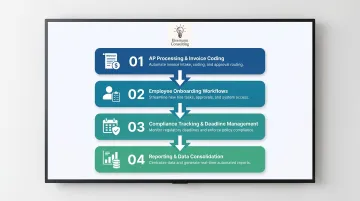
A practical starting sequence for most mid-market companies:
- AP processing or invoice coding
- Employee onboarding workflows
- Compliance tracking and deadline management
- Reporting and data consolidation
Not sure where to start? Eisemann Consulting offers a free operational fix in 72 hours: identify your highest-friction process, get a hands-on fix implemented, and see the results before committing to anything further. This offer is limited to five businesses per month.
Common Pitfalls to Avoid
Automating a Broken Process
AI amplifies whatever it automates. If the underlying workflow is inefficient or poorly documented, automation executes those flaws faster and at scale. The first step is always process redesign, not process automation. Before building any workflow, map what's actually happening — not what's supposed to happen.
Skipping Change Management
70% of change programs fail to achieve their goals, according to McKinsey — largely due to employee resistance and lack of management support. Automation initiatives fail when teams aren't brought along. Employees need to understand what's changing, why it's changing, and what their role looks like on the other side. Without communication and training, even well-designed automation gets worked around.
Over-Engineering from the Start
That people-side failure often masks a second mistake: choosing the wrong tools before validating the problem. Gartner predicts 40%+ of agentic AI projects will be canceled by end of 2027, largely because companies select complex, expensive platforms before confirming the use case with simpler ones.
Start with low/no-code tools. Once the value is proven, then scale.
A quick checklist before committing to any automation build:
- Map the current process end-to-end before touching any tooling
- Confirm the business outcome you're solving for (time saved, errors reduced, cost cut)
- Run a small pilot with existing or low-cost tools before scaling up
- Brief the team early — surprises kill adoption
Frequently Asked Questions
What is back-office automation?
Back-office automation uses AI, RPA, and workflow tools to handle repetitive, rule-based administrative tasks across finance, HR, compliance, and procurement — freeing teams to focus on higher-value work instead of manual processing.
What are the benefits of AI-powered back-office automation?
Reduced operational costs, improved data accuracy, faster processing times, and greater scalability without adding headcount. Automated systems handle increasing volume as your business grows — no proportional staff increase required.
What AI automations can be used in enterprise back-office processes?
Key automation types include invoice capture and coding, employee onboarding workflows, compliance tracking and document management, procurement approvals, data reconciliation, and real-time reporting. Low/no-code tools like Zapier, Airtable, and Retool make many of these accessible without large IT teams.
How does back-office automation reduce labor costs?
Automation eliminates manual data entry, reduces error-correction time, and enables existing teams to handle greater volume. Companies can scale operations without proportionally increasing headcount — one Ardent Partners study found a single AP automation deployment can increase invoices processed per FTE by 268%.
How will AI affect back-office jobs?
AI is evolving back-office roles, not eliminating them. The WEF Future of Jobs Report 2025 projects 170 million new roles created versus 92 million displaced by 2030 — a net gain. Repetitive tasks get automated while employees shift to judgment-intensive, strategic work.
What are the 5 D's of automation?
The 5 D's — Dull, Dirty, Dangerous, Dear (costly), and Difficult — are a practical filter for identifying which tasks are best suited for automation. Most back-office tasks fall into the Dull and Dear categories: repetitive, low-judgment work that's expensive to perform manually.