Introduction
Growing HR teams at mid-market companies are caught in a familiar trap: managing onboarding paperwork, chasing PTO approvals, running payroll, tracking compliance deadlines, and coordinating performance reviews — all through a patchwork of emails, spreadsheets, and disconnected tools.
HR professionals spend up to 57% of their time on administrative tasks, leaving little capacity for the strategic work that moves the business forward. 20% of manually processed payrolls contain errors — each costing an average of $291 to correct.
HR workflow automation fixes this by connecting systems, removing manual handoffs between tools, and giving HR teams back the time to focus on people.
This guide walks through a clear definition, the processes most worth automating, real-world use cases, measurable benefits, common pitfalls, and a practical framework for getting started.
Key Takeaways
- HR workflow automation links multiple HR tasks end-to-end, triggering actions across systems without manual coordination
- Highest-ROI targets are time management, payroll, benefits enrollment, and onboarding
- Core benefits: reduced admin burden, fewer errors, better employee experience, and headcount-efficient scale
- Automating a broken process is the most common failure mode; map and clean workflows before you build
- Start with one or two high-volume workflows, measure results at 30 and 90 days, then expand
What Is HR Workflow Automation?
HR workflow automation uses technology to turn sequential, multi-step HR tasks into digital workflows that trigger and execute automatically—removing the need for manual coordination between people, tools, and systems.
Process Automation vs. Workflow Automation
These terms are often used interchangeably, but the distinction matters for scoping your investment:
| Type | What It Does | Example |
|---|---|---|
| HR Process Automation | Digitizes a single, isolated task | Replacing paper forms with digital equivalents |
| HR Workflow Automation | Connects multiple tasks end-to-end across systems | Triggering IT provisioning, HRIS updates, and welcome emails simultaneously when a hire is confirmed |
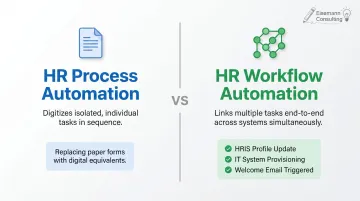
Workflow automation is the more impactful approach. Individual task digitization saves time in isolation; connected workflows eliminate the coordination overhead between tasks entirely.
How It Works in Practice
The mechanics follow a trigger-action model. When a specific event occurs—say, a candidate being marked "hired" in your ATS—a chain of automated actions fires across multiple systems:
- HRIS record is created or updated
- IT provisioning request is submitted automatically
- Onboarding task list is generated and assigned
- New hire receives a personalized welcome email with Day 1 instructions
No HR team member manually initiates any of these steps. The trigger does it.
That kind of end-to-end automation is already scaling fast. Gartner projects AI in HR will automate 50% of HR work by 2030—meaning the teams that build these workflows now will have a significant head start when that shift arrives.
The Core HR Processes Worth Automating
Seven HR functions form the backbone of operations at most growing companies:
- Recruitment
- Onboarding
- Payroll and compensation
- Benefits administration
- Time and attendance
- Performance management
- Offboarding
All seven carry significant automation potential. The key is knowing which tasks within each function actually belong in an automated workflow.
Which Tasks Are Good Automation Candidates
Strong candidates share three characteristics: they're rule-based, high-volume, and have predictable outcomes.
- Approval routing (PTO requests, expense sign-offs)
- Document generation (offer letters, onboarding packets)
- Status notifications and deadline reminders
- Data entry and system updates
- Compliance tracking and audit trail creation
Tasks requiring empathy or nuanced judgment — conflict resolution, performance coaching, disciplinary conversations — should stay human-led. The administrative workflows surrounding those conversations, however, are fair game for automation.
Where Manual Costs Are Highest
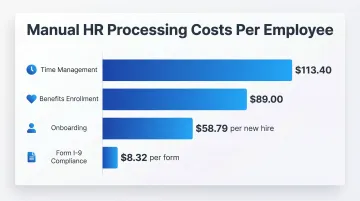
Cost is often what finally moves automation from "nice to have" to priority. Ernst & Young data (via Eddy) puts concrete numbers on manual processing costs per function:
| HR Function | Manual Cost Per Employee |
|---|---|
| Time management | $113.40 |
| Benefits enrollment | $89.00 |
| Onboarding | $58.79 per new hire |
| Form I-9 compliance | $8.32 per form (internal fix only) |
Time management, benefits, and onboarding are the strongest starting points for automation ROI at mid-market scale.
One prerequisite worth calling out before selecting any tool: automation works best on clean, well-defined processes. If a workflow is inconsistent or unclear today, automating it amplifies existing inconsistencies instead of fixing them. Process clarity comes first.
HR Workflow Automation Use Cases
Recruiting and Hiring
Manual recruiting coordination is expensive. The average cost-per-hire for nonexecutive roles sits at $5,475, with average time-to-fill at 42 days—up 24% since 2021.
Automation compresses both metrics by removing coordination delays:
- Job postings distributed automatically across multiple platforms on publish
- New applications trigger immediate Slack or email notifications to hiring managers
- Resume parsing extracts structured candidate data without manual review
- Offer letters auto-generated with candidate details pulled directly from the ATS
- Interview scheduling links sent automatically after stage advancement
Enterprise companies that reduced coordination friction decreased time-to-fill by 11 days year over year, per the 2024 Employ Recruiter Nation Report.
Onboarding and Offboarding
Only 12% of employees strongly agree their organization does a great job onboarding new hires—and weak onboarding directly drives early turnover, which costs $7,500 to $28,000 per departure.
Automated onboarding triggers the following simultaneously when an offer is accepted:
- Account provisioning across required systems
- IT equipment request submitted
- Training module assignments created
- Orientation calendar invites sent
- Personalized welcome message delivered
Offboarding carries its own risk. 63% of businesses may have former employees retaining access to organizational data due to weak offboarding processes. Automation revokes system access, initiates equipment return, generates exit paperwork, and schedules exit interviews—without HR tracking each step manually.
Payroll, Benefits, and Time-Off
Payroll errors are both common and costly. Twenty percent of manually processed payrolls contain mistakes, with a third of those taking two or more pay cycles to fix.
Automation removes the manual touchpoints that cause those errors:
- Wage calculations and tax withholdings processed without manual input
- Benefits eligibility tracked and enrollment routed automatically
- PTO request approvals triggered with manager notifications built in
- Self-service portals replace email chains for routine requests
Performance Reviews and Feedback Cycles
Managers spend an average of 210 hours per year on performance management activities—time that compounds across the organization at significant cost.
Automated performance workflows address the biggest time drains:
- Scheduled reminders sent to reviewers before deadlines
- Feedback forms distributed automatically at the start of each cycle
- 360-degree review routing to the right participants without manual coordination
- AI-powered tools that summarize review data and surface patterns for managers
When one organization automated its review cycle, completion rates jumped to 94%—up from a baseline where HR spent significant time chasing overdue submissions.
Compliance Tracking and Documentation
Compliance is where manual HR processes carry the steepest downside. Form I-9 non-compliance fines range from $281 to $2,789 per paperwork violation, and I-9 errors occur at a 12% rate in manual environments.
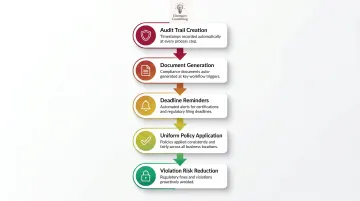
Automation protects against these exposures by:
- Creating consistent audit trails with timestamps at each process step
- Auto-generating required documentation at defined workflow triggers
- Sending deadline reminders for certifications and regulatory filings
- Applying policies uniformly across locations—critical for companies operating across multiple states
Benefits of HR Workflow Automation
Reduced Administrative Burden
When HR teams spend 57% of their time on transactional tasks, strategic work—talent planning, culture initiatives, retention programs—gets deprioritized. Automation reclaims that capacity. Eisemann Consulting's approach targets the highest-volume manual workflows first, consistently freeing up 10–20 hours per week for HR teams and operations managers.
Improved Accuracy and Consistency
Human error in payroll, compliance documentation, and data entry is both costly and preventable. Automated workflows apply the same rules every time, eliminating typos, missed steps, and inconsistent policy application. For compliance purposes, a consistent process is also an auditable one—critical when regulators ask how a decision was made.
Better Employee Experience
Self-service portals let employees handle common requests on their own schedule, without waiting on HR:
- Submit PTO requests and receive instant confirmation
- Access policy documents and employee handbooks anytime
- Update benefits elections during open enrollment without paper forms
- Receive onboarding materials before day one
When these interactions run smoothly, frustration with HR drops and confidence in the organization rises.
Given that new employee turnover can reach 50% in the first 18 months, the onboarding piece alone justifies the investment.
Scalability Without Proportional Headcount Growth
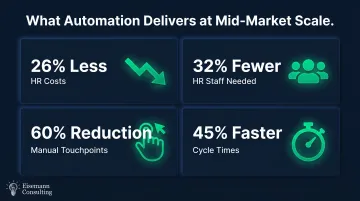
A well-automated HR operation handles more employees without a proportional increase in HR headcount. The manual handoffs that once consumed time are replaced by automated workflows. Organizations using integrated HR technology spend 26% less on HR costs and operate with 32% fewer staff—a gap that widens as headcount grows.
For mid-market companies in active growth phases, this is the difference between scaling smoothly and hiring reactively just to keep pace.
Eisemann Consulting's client work has produced 60% reductions in manual touchpoints and 45% faster cycle times through systematic workflow optimization across HR and operations functions.
Data-Driven Decision Making
Automated HR systems capture structured data at each workflow step, enabling HR leaders to track time-to-hire, onboarding completion rates, turnover patterns, and performance trends. Currently, only 20% of organizations track quality of hire—a gap that structured automation closes naturally, since the data is captured as a byproduct of the process running.
Common Challenges and How to Avoid Them
Only 24% of HR functions are maximizing business value from their HR technology—which means most organizations are paying for tools they're not fully using. Three challenges explain most of that gap.
Poor process design. Automating a broken or inconsistent process makes it worse. Document and standardize the workflow manually before introducing any automation tools. If you can't describe every step clearly, you're not ready to automate it.
Tool overload and integration gaps. Businesses currently use an average of six different HCM providers, creating data silos and redundant manual workflows. Prioritize platforms with strong native integrations, or use a middleware layer like Zapier, Airtable, or Make to connect existing systems and keep HR data centralized. Eisemann Consulting implements these tools directly for clients, building custom workflows that connect the systems teams already use.
Change resistance and adoption gaps. Even well-designed automation fails if employees and managers don't use it. Approximately 70% of change initiatives fail broadly, often due to insufficient stakeholder engagement. Address this by involving affected teams early, communicating clearly about what changes and why, and rolling out in phases with training built into the process from the start.
Getting ahead of these issues before rollout is what separates automation projects that stick from ones that stall.
How to Get Started with HR Workflow Automation
Step 1: Run a Process Audit
Identify which HR tasks consume the most time, generate the most errors, or produce the most employee complaints. These are your highest-ROI automation candidates. Don't try to automate everything at once—pick one or two workflows and start there.
Step 2: Choose Tools That Match Your Maturity Level
- Entry-level: No-code tools like Zapier or Airtable, or workflow features already inside your existing HRIS
- Mid-complexity: Dedicated HRIS platforms (BambooHR, Rippling) with built-in automation engines
- Higher complexity: Custom workflow design across multiple systems, often requiring consulting support
If your team lacks in-house automation expertise, a consulting partner can handle the full implementation: process audit, workflow builds, system integration, and team training. Eisemann Consulting's AI Automation Starter package, for example, delivers 3–5 custom HR workflows with 30 days of optimization support—no technical background required on the client side. They also offer a free operational assessment with a 72-hour turnaround for teams that want to pressure-test the opportunity before committing.
Step 3: Measure, Iterate, and Expand
Define success metrics before you launch: time saved per workflow, error rate reduction, employee satisfaction scores. Review results at 30 and 90 days—refine what isn't working, and use early wins to build organizational appetite for automating the next process.
Frequently Asked Questions
What is automation in human resource management?
HR automation is the use of technology to handle repetitive, rules-based tasks—payroll processing, document routing, onboarding workflows—without manual intervention. It frees HR teams to focus on strategic and people-centered work rather than administrative coordination.
What are HR automation tools?
HR automation tools range from HRIS platforms like Workday, BambooHR, and Rippling (with built-in workflow engines) to no-code integration platforms like Zapier or Airtable. The right fit depends on your team's size, technical capacity, and how many systems need to talk to each other.
What are the 7 core HR processes?
Recruitment, onboarding, payroll and compensation, benefits administration, time and attendance tracking, performance management, and offboarding.
What is the difference between HR automation and HR workflow automation?
HR automation typically refers to digitizing individual tasks—replacing paper forms with digital ones. HR workflow automation connects multiple tasks and systems into an end-to-end process that triggers and flows without manual handoffs between each step.
Can small or mid-sized companies benefit from HR workflow automation?
Mid-market companies often see the greatest ROI because they face enterprise-level complexity without enterprise-level HR headcount. Automation lets a lean HR team handle the volume and consistency that would otherwise require additional headcount.
What HR tasks should NOT be automated?
Tasks requiring human empathy, nuanced judgment, or sensitive interpersonal handling—conflict resolution, performance coaching conversations, disciplinary actions—should remain human-led.