Introduction
Most growing companies pour resources into customer-facing systems — CRM upgrades, marketing automation, sales tools — while back-office operations run on spreadsheets, manual data entry, and approval chains that haven't changed in years.
For mid-market companies, this gap compounds fast. The symptoms are familiar:
- Delayed invoicing strains cash flow
- Payroll errors trigger IRS penalties
- New hires sit idle waiting for system access
- Departed employees retain login credentials for weeks
- Compliance deadlines arrive while someone is still manually pulling data from three systems
According to McKinsey, top-quartile companies run G&A functions at nearly half the cost of bottom-quartile peers in the same sector. Closing that gap requires a fundamentally different approach to how back-office work gets done.
This article covers the five back-office functions where automation delivers the fastest, clearest return: Accounts Payable & Receivable, Payroll Processing, HR Onboarding & Offboarding, IT Service Desk Operations, and Compliance Reporting.
Key Takeaways
- Manual back-office processes drain mid-market companies in time, accuracy, and compliance exposure
- The five highest-ROI automation targets share three traits: high volume, rule-based logic, and measurable manual cost
- AP/AR automation alone can cut cost-per-invoice from $13+ to under $5
- No-code tools (Zapier, Airtable, Retool) make these automations accessible without a large IT team
- Start with the function generating the most friction, errors, or delays — that's your highest-ROI entry point
What Is Back-Office Automation?
Back-office automation uses digital tools and workflows to handle administrative tasks that support business operations but don't involve direct customer interaction — finance, HR, IT, and compliance are the most common areas.
Most mid-market companies aren't starting from scratch. They already have accounting software, an HRIS, and some kind of ticketing system. Back-office automation usually means connecting and coordinating those existing systems, not replacing them.
Three Common Approaches
| Approach | Best For | Examples |
|---|---|---|
| Workflow Automation | Process sequencing, approvals, notifications | Zapier, Make, Airtable |
| RPA (Robotic Process Automation) | Repetitive, rules-based UI interactions | UiPath, Automation Anywhere |
| AI-Assisted Automation | Data extraction, anomaly detection, routing | ChatGPT integrations, Claude |
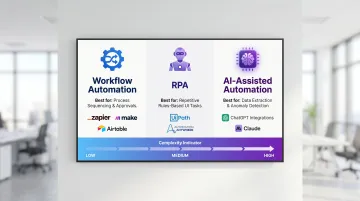
Workflow automation is typically the right starting point — lower cost, faster to implement, and no automation engineer required. RPA and AI layers come later as complexity grows.
The real gains don't always come from automating individual tasks. McKinsey documented a financial institution that cut a regulatory reporting process from one week to one hour. The breakthrough wasn't automating tasks in isolation — it came from resequencing approvals and grouping automatable steps together.
The Top 5 Back-Office Functions That Should Be Automated
These five functions share the highest concentration of high-volume, rule-based, error-prone steps. They directly affect cash flow, compliance, employee experience, and operational capacity — which is why they're the most common sources of inefficiency in growing companies.
Accounts Payable & Receivable
AP/AR consistently tops the list because the problems are measurable and the ROI is immediate.
Manual invoice processing creates a predictable chain of problems: someone keys data into an ERP, someone else routes it for approval, discrepancies get caught (or don't), payments run late, and reconciliation becomes a monthly ordeal.
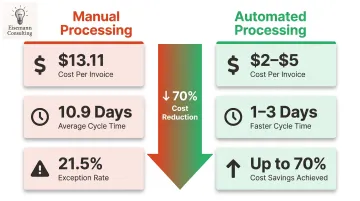
According to Ardent Partners' 2025 AP benchmark, the average cost to process a single invoice manually is $13.11, with a cycle time of 10.9 days and an exception rate of 21.5%. Automated processing brings that cost down to the $2–5 range.
Tasks within AP/AR best suited for automation:
- Invoice data capture and extraction (OCR tools)
- Three-way PO matching (purchase order, invoice, goods receipt)
- Payment approval routing based on thresholds
- Automated dunning notices for overdue receivables
- Reconciliation against bank feeds
For mid-market companies, the practical path is OCR tools integrated with QuickBooks, Xero, or NetSuite via a workflow automation layer. No custom development required — tools like Zapier or Make can handle the orchestration between systems.
High-volume businesses processing 1,000+ invoices monthly report up to 70% cost savings after automating AP. At lower volumes, faster cycle times and lower exception rates still deliver a clear, provable return.
Payroll Processing
Payroll is recurring, deadline-driven, and subject to multi-jurisdictional tax rules. Small errors don't just cause frustration — they create legal exposure.
The numbers are stark: 40% of small businesses pay a payroll tax penalty annually, with average costs ranging from $845 to $1,000 per occurrence. The IRS assessed more than 4.4 million employment tax penalties totaling nearly $26.9 billion in fiscal year 2024. And the employee impact is just as serious — 49% of workers start looking for a new job after just two payroll errors.
Where payroll automation delivers the most value:
- Salary and deduction calculations tied to timekeeping data
- Tax withholding and multi-state filing
- Direct deposit scheduling
- Payslip generation and delivery
- Year-end W-2/1099 generation
An important distinction: many mid-market companies already have a payroll platform (Gusto, ADP, Paychex). The problem isn't the platform — it's the manual handoffs between HR data and payroll inputs. When someone has to export a CSV from the HRIS and upload it to payroll every pay period, that's where errors creep in.
Connecting HRIS, timekeeping, and payroll systems via API or automation tools eliminates those handoffs, creates an automatic audit trail, and removes the human error risk at the most sensitive point in the process.
HR Onboarding & Offboarding
Manual HR lifecycle management has two distinct cost centers — and both are frequently underestimated.
Gallup research shows only 12% of employees strongly agree their company does a great job onboarding. SHRM estimates it costs six to nine months of an employee's salary to replace someone who leaves — and turnover can hit 50% in the first 18 months.
Delayed system provisioning, missing paperwork, and uncoordinated welcome sequences all accelerate that early attrition.
Offboarding carries its own risk. Wing Security found that 63% of businesses have former employees with active system access post-departure.
Beyond Identity's research found 83% of former employees continued accessing prior employer accounts after leaving, and 56% used that access to harm their previous employer. This isn't just an HR efficiency issue — it's a security one.
Automation tasks for each phase:
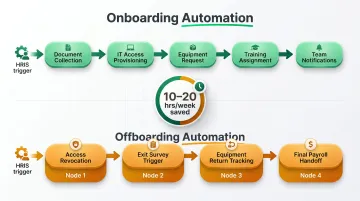
Onboarding:
- Document collection and e-signature
- IT access provisioning triggered by HRIS hire date
- Equipment request routing
- Training schedule assignment
- Notification sequences to IT, Finance, and the hiring manager
Offboarding:
- Automated access revocation checklists
- Exit survey triggers
- Equipment return tracking
- Final payroll handoff
Mid-market companies don't need a dedicated automation engineer to get this working. A Zapier workflow triggered by a new hire record in BambooHR or Rippling can kick off parallel workflows across IT, Finance, and Operations simultaneously — all without custom code. Well-connected HR lifecycle workflows typically save 10–20 hours per week once the handoffs are eliminated.
IT Service Desk & Help Desk Operations
The majority of incoming IT tickets are not complex problems — they're the same five requests, submitted repeatedly, consuming analyst time that should be spent on infrastructure and security.
Gartner estimates 70% of Tier-1 IT tickets can be automated. Password resets alone account for 20–50% of total help desk volume. Identity and access requests make up another 35–40%. The average organization processes 10,675 tickets monthly — even automating half of Tier-1 volume represents substantial time recovery.
High-impact IT automation use cases:
- Intelligent ticket routing and prioritization
- Automated resolution of password resets and account unlocks
- Access provisioning and deprovisioning triggered by HR events
- Status update notifications that reduce ticket re-opens
- Proactive monitoring alerts before issues generate tickets
Reactive IT support generates ticket volume. Automated monitoring — detecting storage thresholds, failed login patterns, or application errors — can trigger resolution workflows before users are affected, reducing both ticket volume and downtime.
The integration angle here also connects back to offboarding: linking HRIS offboarding workflows to IT access revocation closes the gap where departed employees retain credentials for days or weeks after exit.
Compliance Reporting & Audit Preparation
Compliance reporting often gets deprioritized as an automation target because it feels infrequent. Quarterly. Annual. Not urgent enough. That logic breaks down fast.
Manual compliance teams lose up to 70% of their time to administrative data aggregation rather than actual risk management. 83% of organizations report moderate or major delays caused by manual compliance workflows. And 55% of companies still track multi-state compliance using spreadsheets — a method that works at 50 employees and collapses at 200.
The penalty exposure is real: 33% of companies incurred compliance penalties in the past year, averaging approximately $16,000 per occurrence. And 59% of those companies only discovered the issue after receiving a state notice.
Compliance tasks that automate well:
- Scheduled data collection from source systems (HRIS, ERP, accounting)
- Regulatory deadline tracking and alert workflows
- Automated generation of audit-ready reports
- Document version control and retention policy enforcement
The good news: compliance automation is often achievable with tools companies already have. Most accounting, HRIS, and ERP systems have built-in reporting capabilities that simply need to be scheduled and connected. The missing piece is usually the orchestration layer — getting the right data to the right person at the right time, automatically.
How to Identify Which Back-Office Function to Automate First
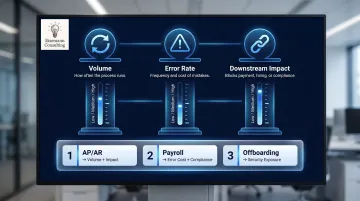
Before selecting a tool, you need to select the right problem. A simple prioritization framework evaluates each candidate function on three dimensions:
- Volume — How many times per week or month does this process run?
- Error rate — How often do mistakes occur, and what do they cost to fix?
- Downstream impact — Does a delay here block payment, hiring, or compliance?
The functions that score highest across all three should be automated first. For most mid-market companies, AP/AR wins on volume and downstream impact; payroll wins on error cost and compliance risk; offboarding wins on security exposure.
Before You Automate — A Readiness Check
Automating a broken or undocumented process won't solve the underlying issue — it will surface problems faster and at higher volume. Before committing to any automation project, ask:
- Is the process documented? Can someone describe every step without improvising?
- Is the process stable? Does it run the same way each time, or does it vary based on who's doing it?
- Are the inputs consistent? Does the data coming in have a reliable format, or is it different every time?
If any of those answers is "no," the first step is process documentation and standardization — not automation.
A structured workflow audit, even an informal one, surfaces high-ROI targets quickly. This is where Eisemann Consulting's free 72-hour operational fix comes in: Julie Eisemann's team identifies your single biggest operational bottleneck and implements a working improvement within 72 hours — no commitment, no long discovery phase.
Spots are capped at five businesses per month to maintain turnaround speed.
Conclusion
These five functions — AP/AR, payroll, HR onboarding and offboarding, IT service desk, and compliance reporting — represent the highest concentration of manual effort and operational risk in most growing companies. Automating even one of them delivers real, measurable returns: faster cycle times, fewer errors, less headcount pressure, and cleaner audit trails.
The practical next step is simple: pick one function from this list, map its current manual steps, and identify the first handoff that could be automated. That single exercise usually makes the highest-ROI starting point obvious.
That mapping exercise takes time, though — and the right expert can compress weeks of analysis into a single working session. Eisemann Consulting brings 26+ years of operational leadership, including Fortune 500 engagements, to mid-market companies on a project basis with no long-term contracts. The AI Automation Starter ($8,000 one-time) and Scalability Accelerator ($15,000 for three months) are built to deliver measurable results without a large IT team or a multi-year commitment. Reach out to julie@eisemannconsulting.com to claim one of the five free operational fix spots this month.
Frequently Asked Questions
What is back-office automation?
Back-office automation uses digital tools and workflows to handle repetitive administrative tasks — invoicing, payroll, HR processes, compliance reporting — without direct customer interaction. Tools range from simple workflow builders like Zapier to AI-powered systems, depending on the function's complexity.
How is automation being used in accounting?
The most common accounting automation use cases are invoice capture and matching, payment approval routing, expense categorization, bank reconciliation, and financial report generation. Most mid-market accounting platforms — QuickBooks, Xero, NetSuite — support automation natively or through integration tools.
What are examples of back-office software?
Common categories include workflow automation (Zapier, Make), HRIS (BambooHR, Rippling), payroll (Gusto, ADP), accounting and ERP (QuickBooks, NetSuite), IT service desk (Freshservice, Jira), and document management (DocuSign, SharePoint). No-code tools like Airtable and Retool connect these systems without custom development.
What are the four stages of process automation?
The four stages are: (1) identify and document the process, (2) digitize and connect the systems involved, (3) automate the rule-based steps using workflow or RPA tools, and (4) monitor, measure, and continuously improve. Most mid-market companies stall at stage two because of disconnected older, siloed systems.
What is back-office ERP?
A back-office ERP integrates core administrative functions — finance, HR, procurement, inventory, and compliance — into a single platform. Systems like NetSuite, SAP Business One, and Microsoft Dynamics 365 serve as the data backbone that automation tools connect to and build upon.
What are the top five automation tools for back-office functions?
The five most widely used tools for mid-market back-office automation are Zapier (workflow automation), UiPath or Automation Anywhere (RPA), Airtable (database and workflow), Microsoft Power Automate (enterprise integration), and Rippling or BambooHR (HR process automation). Start with the function causing the most friction — that determines your tool, not the other way around.