Introduction
Manual onboarding breaks down fast when you're hiring at scale. What works for 20 employees becomes a compliance liability, a retention problem, and an HR time sink at 200.
Employee onboarding automation is the use of AI and workflow tools to replace manual, repetitive HR tasks — so new hires integrate faster, more consistently, and with fewer errors at every stage.
This guide is for HR leads, operations managers, and mid-market companies growing past the point where manual onboarding is sustainable. That growth comes with a cost: poor onboarding drives early turnover (20% of new hires leave within 45 days, per AIHR's 2026 research) and slows time-to-productivity — both expensive problems that scale with headcount.
What follows is a practical breakdown of onboarding automation — what it is, where it delivers the most impact, how it works end-to-end, and where implementations typically stall — so your team can move forward without the common pitfalls.
Key Takeaways
- Onboarding automation replaces manual HR tasks with triggered workflows that run consistently for every new hire
- It reduces onboarding timelines, lowers compliance risk, and frees HR to focus on culture instead of paperwork
- Highest-impact areas: pre-boarding documentation, system access provisioning, and structured 30/60/90-day follow-through
- Process clarity must come before tool selection — automation amplifies what's working and magnifies what isn't
- Best results come from a hybrid model: automate administrative tasks, keep relationship-building personal
What Is Employee Onboarding Automation?
Employee onboarding automation applies workflow logic, AI, and integration tools to manage the sequence of administrative tasks required to bring a new hire from offer acceptance to full productivity — without manual intervention at every step.
The goal is a consistent, repeatable onboarding experience. Every hire, regardless of start date, department, or location, gets the same quality of start.
How It Differs from Your HRIS or ATS
The terms get used interchangeably, but they do different things:
- HRIS and ATS: Store and track employee data
- Onboarding automation: Acts on that data — triggering workflows, routing tasks, and moving people through defined stages automatically
Your HRIS knows a new hire starts Monday. Onboarding automation is what sends offer documents, notifies IT, provisions system accounts, and schedules orientation — automatically, the moment that record exists.
Why Automating Onboarding Matters for Growing Organizations
According to Brandon Hall Group, organizations with strong onboarding improve new hire retention by 82% and boost productivity by over 70%. Yet only 12% of employees strongly agree their company does a great job of onboarding, per Gallup.
That gap is mostly an operational failure — not a strategy one. Most companies know what good onboarding looks like. They just don't have the infrastructure to deliver it consistently at scale.
The Scale Bottleneck
Manual onboarding creates a predictable failure mode as companies grow from 50 to 500 employees:
- Each hire requires individual HR attention for document routing, access requests, and task coordination
- Errors in data entry or compliance steps compound across hundreds of hires
- HR teams report spending approximately 20 hours per new hire on administrative onboarding tasks — dropping to 12 hours at companies using AI-assisted automation, per Business Insider's 2025 reporting
That administrative drag has a direct cost beyond HR bandwidth — it shapes how new hires experience their first weeks.
The Retention Link
New hires who feel disorganized or unsupported in the first 30 days are significantly more likely to leave.
Research shows 69% of employees are more likely to stay for three years after a positive onboarding experience. That retention effect directly reduces the cost of replacement — SHRM benchmarks average cost-per-hire at approximately $4,700, with total replacement costs often reaching three to four times the position's salary.
Where the Market Stands
Only about 20% of companies currently automate onboarding tasks, despite 56% of HR departments already using some form of HR automation. Companies that close that gap now are building an operational foundation their competitors will spend years trying to replicate.
For organizations with global or mobile workforces — hiring across different countries, time zones, or immigration statuses — automation is especially critical. Compliance documentation routing, country-specific requirements, and I-9 workflows are high-risk areas where manual processes create real legal liability.
How Employee Onboarding Automation Works: End-to-End
Onboarding automation is event-driven. A trigger — typically a hire being marked active in your ATS or HRIS — fires a chain of automated actions across systems simultaneously. No human needs to kick off each step.
The Core Inputs
New hire data flows from your ATS or HRIS into the automation layer. Role, department, location, start date, and employment type all feed into the system — populating document templates, activating the right workflow branches, and assigning task owners with deadlines.
Conditional logic does the heavy lifting. A remote international hire triggers a different document and access workflow than a domestic office hire. A contractor gets a different task sequence than a full-time employee. That branching logic is also what drives the biggest operational payoff: speed.
The Time Compression Effect
The advantage isn't just consistency — it's parallelism. Manual onboarding runs sequentially: HR sends documents, waits, then notifies IT, waits, then payroll gets involved. Automation orchestrates HR, IT, legal, payroll, and the hiring manager simultaneously, collapsing what was a 10-day process to 1–3 days.
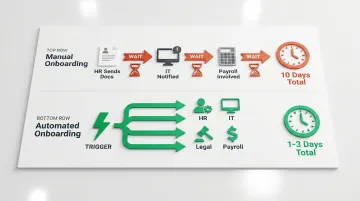
ServiceNow reports automated onboarding can compress the new hire experience from three days to a few hours.
Tools That Make This Accessible
Low/no-code platforms — Zapier, Workato, Airtable — put onboarding automation within reach of mid-market HR and operations teams without requiring dedicated engineering. Zapier, for example, maintains a dedicated employee onboarding automation framework for triggering workflows when HRIS records update.
For teams that need implementation support, Eisemann Consulting builds these automations using a tool-agnostic approach — assessing the existing stack before recommending or configuring any tooling. The AI Automation Starter engagement ($8,000 one-time) includes a process audit, three to five custom workflows, integration with existing systems, and 30 days of optimization support.
Pre-Boarding: Before Day One
This phase begins at offer acceptance. Automated workflows:
- Generate and route employment documents for e-signature
- Create HRIS and system accounts
- Trigger IT equipment orders
- Send welcome communications with task checklists
- Assign pre-boarding compliance tasks
All of this happens before the hire walks through the door.
Day One and First-Week Integration
On the start date, automation triggers:
- Orientation scheduling and calendar invites
- Communication platform access (Slack, Teams, etc.)
- Role-specific training module assignments
- Introductions to key team members and assigned buddy/mentor
The new hire receives a structured sequence rather than waiting on HR to direct each step.
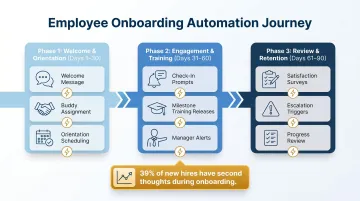
30–60–90 Day Follow-Through
Effective onboarding automation doesn't stop at week one:
- Scheduled check-in reminders to the manager at 30, 60, and 90 days
- Milestone-based training releases tied to role progression
- Automated satisfaction surveys at key intervals
- Escalations if milestones aren't completed on time
Most manual onboarding collapses here. The first week gets attention; everything after gets forgotten. Automation makes follow-through the default, not the exception.
Where Onboarding Automation Has the Most Impact
Document Management and Compliance
Generating role-specific contracts, routing for e-signature, capturing policy acknowledgments, and storing completed documents with audit trails eliminates the single most error-prone manual step.
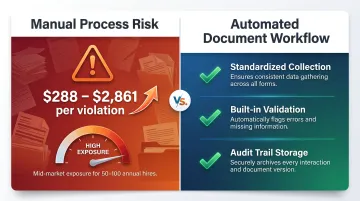
The compliance stakes here are rising. In early 2026, ICE reclassified a range of Form I-9 errors from correctable procedural failures to substantive violations — with fines now ranging from $288 to $2,861 per violation. For a mid-market company onboarding 50–100 hires annually, even a modest manual error rate creates real financial exposure. Automated document workflows standardize collection and validation, reducing that risk.
System Access Provisioning
Waiting days or weeks for system access is the most commonly cited frustration new hires report — and it signals disorganization before they've completed their first week. Automated provisioning assigns access to the correct applications, groups, and shared resources based on role and department the moment a hire record is confirmed, with no IT ticket required.
Cross-Departmental Task Coordination
Manual onboarding puts HR in the middle of every handoff — chasing IT for access, following up with payroll, and nudging hiring managers on paperwork. Automation eliminates that bottleneck by routing tasks to all stakeholders simultaneously, with built-in escalations when deadlines slip. Each team sees exactly what they own and when it's due.
Structured Engagement Through 90 Days
Automated welcome messages, check-in prompts, buddy assignment notifications, and feedback surveys at key milestones maintain engagement without requiring HR to manage each touchpoint. 39% of new hires report having second thoughts during onboarding — and without structured touchpoints in that window, companies lose people they've already invested in hiring.
Key Factors That Affect Onboarding Automation Outcomes
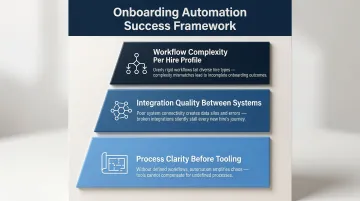
Not all automation implementations deliver the same results. Three factors consistently determine success or failure:
1. Process clarity before tooling. Automation amplifies whatever process already exists — broken or not. Teams that map their current onboarding steps in detail before selecting tools consistently launch faster and encounter fewer rework cycles. Those that jump straight to software end up automating their existing problems.
2. Integration quality between systems. Your ATS, HRIS, communication tools, access management platforms, and payroll systems must exchange data reliably. Poor integrations create duplicate entry, missed triggers, and the same manual work you were trying to eliminate. When evaluating platforms, look for:
- Native integrations over custom connectors (more stable, easier to maintain)
- Bi-directional data sync, not one-way pushes
- Clear error logging so failed triggers don't go unnoticed
3. Workflow complexity per hire profile. Organizations with multiple employment types — full-time, contractor, executive, global hire — need conditional logic that adapts per profile. Applying a single onboarding workflow to all hire types is one of the most common failure points for scaling companies.
Common Misconceptions and When Automation Isn't Enough
Automation Replaces HR
It doesn't. Automation handles administrative tasks, not relationship-building or judgment calls. Companies that over-automate without preserving intentional human touchpoints — manager welcome calls, team introductions, buddy check-ins — report lower new hire satisfaction even when their administrative processes improve. The administrative efficiency gains are real; the human moments still need to be designed deliberately.
Any Automation Is Better Than None
Automating a poorly designed process creates a consistently bad experience at scale. Common examples include:
- Automating excessive documentation requests in the wrong order
- Provisioning access to systems a new hire doesn't actually need
- Sending generic welcome emails that feel impersonal
The result is confusion and frustration — delivered more efficiently.
When Automation Isn't the Right Tool
Some situations require a human conversation, not a template:
- Salary disputes
- Visa-related documentation questions
- Benefits edge cases
- Cultural integration challenges
The right design routes these immediately to the appropriate person. A well-built automation knows when to step aside and escalate — not when to push a new hire through another workflow.
Frequently Asked Questions
How do you automate employee onboarding?
Start by mapping your existing manual onboarding steps and identifying which tasks are repetitive and rule-based. Then use an integration platform or low/no-code tool — Zapier, Workato, or similar — to trigger those tasks automatically from an HRIS or ATS event. Getting the process right before picking a tool is what makes the difference between a workflow that runs and one that gets abandoned.
What is an example of an automated onboarding workflow?
When a hire is marked active in your ATS, the workflow automatically creates their HRIS profile, sends an e-signature request for their employment contract, notifies IT to provision system access, and delivers a welcome email with their task checklist — all without anyone manually initiating a single step.
What are the 5 C's of employee onboarding?
The five C's — Compliance, Clarification, Culture, Connection, and Confidence — cover the full onboarding scope (framework developed by Dr. Talya Bauer). Automation handles Compliance and Clarification well, freeing HR to focus time on Culture, Connection, and building new hire Confidence through intentional touchpoints.
What is the average cost per employee for onboarding?
SHRM benchmarks average cost-per-hire at $4,700, with total replacement costs running three to four times the position's salary. Automation reduces this figure by cutting administrative hours and the rework created by manual errors.
What is the 30/60/90 onboarding rule?
The 30/60/90 rule structures onboarding across three phases: learning the role in the first 30 days, contributing independently by 60 days, and taking ownership by 90 days. Automation supports this by scheduling staged task releases, training modules, and manager check-in prompts at each milestone.
How can HR automation improve employee onboarding?
HR automation replaces manual coordination with consistent, triggered workflows — reducing time-to-productivity, eliminating missed compliance steps, and reclaiming HR hours for the relationship-building work that actually drives retention. The operational gains are real, but the bigger win is what HR can do with the time it gets back.