Introduction
Most professional services firms aren't losing clients because of bad work — they're losing ground because of slow work. Rising client expectations, leaner teams, and an explosion of AI tools are forcing a hard look at how operations actually run.
Mid-market companies feel this most acutely. They carry enterprise-level client complexity without enterprise-level headcount — and the gap shows up in places like manual data entry across five systems consuming 15+ hours of staff time every week. Hours that should have been billable.
According to McKinsey's 2025 Global Survey, 88% of organizations now regularly use AI in at least one business function — up from 78% just a year earlier. But nearly two-thirds haven't started scaling it. For mid-market firms still running manual workflows, that gap is the difference between scaling efficiently and staying stuck.
This post breaks down five trends defining AI workflow automation in professional services in 2026 — and what each one means for HR teams, operations leaders, and mid-market firms trying to scale without adding headcount.
Key Takeaways
- Agentic AI is handling multi-step professional services workflows — client intake, compliance tracking, document routing — without human prompting
- Low/no-code platforms like Zapier, Airtable, and Make have made full-scale automation accessible to non-technical operations teams
- Human-in-the-Loop (HITL) is now standard for high-stakes work — AI does the processing, humans make the final calls
- AI document intelligence is eliminating manual handling of contracts, filings, and forms that consume hours of staff time weekly
- Tool sprawl is being replaced by integration layers that connect existing platforms without requiring a full-system overhaul
Trend 1: Agentic AI Enters Professional Services Workflows
What Agentic AI Actually Means in Practice
Earlier automation was essentially a relay race: a trigger fires, one action happens, done. Agentic AI is different. It can reason through a sequence of steps, make decisions mid-process, and take action across multiple systems — without a human initiating each step.
In professional services terms: imagine a new client submits an intake form. An agentic workflow captures that data, creates a CRM record, sends a personalized welcome email, assigns the matter to the right team member based on service type, and flags any missing compliance documents — all without anyone touching a keyboard.
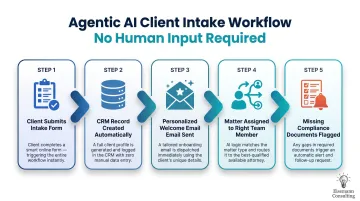
Leading firms aren't piloting this anymore — it's live in their intake operations right now.
Where Adoption Actually Stands
Gartner's 2025 Hype Cycle places AI agents among the fastest-advancing AI technologies, describing the shift as a "gradual pivot from generative AI toward agentic AI." McKinsey's data shows 62% of organizations are experimenting with agentic AI, though only 23% are actively scaling it across a business function.
That 39-point gap between experimenting and scaling is where mid-market firms have a real opening. Infrastructure costs have fallen sharply, and low/no-code tooling means deployment no longer requires a dedicated engineering team.
One critical caveat: agentic AI requires clean, documented, repeatable processes before it can be automated. Firms without process clarity will find that AI amplifies their chaos rather than solving it. Process documentation has to come first.
That's why Eisemann Consulting's AI Automation Starter engagements open with a process audit — the automation roadmap only gets useful once the current workflow is mapped and understood.
Trend 2: Low/No-Code Tools Empower Non-Technical Teams
The Democratization of Automation
Operations managers, HR professionals, and consultants can now build automated workflows without touching a line of code. Platforms like Zapier, Airtable, Make (formerly Integromat), and Retool put that capability directly in the hands of operations leads — no IT queue required, no developer budget needed.
Forrester projects the low-code market will approach $50 billion by 2028, and Gartner estimates 80% of low-code platform users will come from outside IT departments by 2026. Nearly 60% of businesses have already integrated automation solutions into their operations, according to Zapier's 2026 automation statistics. That adoption is happening at the workflow level — not in abstract strategy decks.
What These Tools Actually Automate
The workflows that eat the most staff time are the best candidates for low/no-code automation:
- Client intake forms that auto-populate CRM fields and route to the right team member
- Onboarding sequences that trigger next steps based on document submission status
- Approval routing that reaches the right reviewer without the email chain
- Invoice triggers fired automatically when a project milestone is marked complete
- Client status notifications sent without manual drafting
A growing SaaS company that worked with Eisemann Consulting had manual data entry running across five systems, costing 15+ hours per week. After implementing Zapier workflows connecting their CRM, project management, accounting, and communication tools, they saved 18 hours per week and cut data entry errors by 95%.
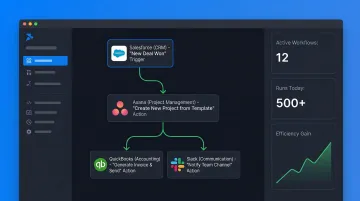
The result: $60K in annual cost savings and a real-time reporting dashboard built in Retool — deployed without a single line of custom code.
For mid-market firms, the barrier isn't technology anymore — it's knowing where to start.
Trend 3: Human-in-the-Loop Becomes the Standard for High-Stakes Work
Why HITL Isn't a Compromise — It's the Architecture
Human-in-the-Loop (HITL) automation doesn't mean slower automation. It means smarter automation design. AI handles the processing, classification, drafting, or routing. A human steps in at the specific decision point that carries risk, accountability, or judgment.
In immigration case management, that looks like: AI ingests supporting documents, flags missing items, populates the case file, and surfaces the filing to a reviewer — who then applies expertise before anything goes to a government agency. The AI does the volume work. The human owns the outcome.
This model is now the standard in professional services sectors where errors carry real consequences:
- Immigration and global mobility case review
- Employment contract markup and approval
- Financial compliance audit sign-off
- HR decisions requiring manager or legal review
- Client-facing communications in sensitive matters
The Performance Case for HITL
Thomson Reuters' 2025 Generative AI in Professional Services Report highlights what this looks like in practice. One firm — Justly Prudent — achieved 5x ROI with AI-assisted tools and doubled its litigation capacity. Another firm reduced hour-long document reviews to minutes using AI-assisted workflows with human review at key decision points.
This is the model Eisemann Consulting operationalizes through its "AI-Enabled, Human-Led" approach: automation handles the repeatable processing, consulting expertise handles the judgment calls. Neither works as well without the other.
HITL automation also changes how teams experience the work itself. Roles shift from manual data entry and document tracking toward oversight, quality control, and direct client engagement. That shift tends to drive internal adoption — people support automation that makes their day-to-day work more substantive, not less.
Trend 4: AI-Powered Document Intelligence Eliminates Back-Office Bottlenecks
Professional services firms are, fundamentally, document-intensive operations. Contracts, visa applications, compliance filings, tax forms, client agreements — the volume is enormous, and the manual handling costs are real.
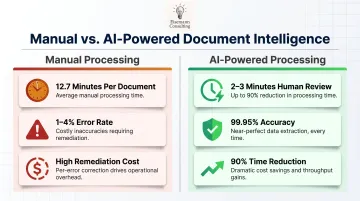
Research from DocuExprt puts average manual document processing time at 12.7 minutes per document. Manual data entry error rates run between 1–4%, with each error costing $10–$150 to remediate when downstream consequences are included. For organizations with 100+ employees, these costs compound into hundreds of thousands of dollars annually.
AI document intelligence addresses this at the source. OCR combined with LLM-powered extraction can:
- Extract key contract clauses and surface them for attorney review without manual reading
- Auto-populate CRM and case management fields from intake documents
- Flag missing or inconsistent information in filings before submission — not after rejection
- Route documents to the correct workflow based on document type and content
For immigration work specifically, this means supporting documents for visa petitions can be ingested, classified, and checked for completeness automatically. A paralegal or case manager reviews the flagged exceptions rather than processing each document from scratch.
Those efficiency gains also translate directly into accuracy. AI-powered extraction with human-in-the-loop oversight achieves up to 99.95% accuracy — compared to the 1–4% error rate inherent in manual processing. The time impact is equally measurable: automated workflows reduce processing time by up to 90%, bringing human touch-time down to 2–3 minutes for review rather than 12+ minutes for processing.
Trend 5: Workflow Consolidation Replaces Disconnected Tool Stacks
Most mid-market professional services teams don't have a software problem — the real bottleneck is integration. Email, CRM, project management, billing, compliance tracking, and communication platforms all operate as separate islands.
The scale of this is larger than most teams realize. Okta's research shows SMBs (under 500 employees) deploy an average of 58 different applications, with the global average across all company sizes reaching 101 apps. Workers toggle between apps over 1,200 times per day, costing roughly 4 hours per week in reorientation time alone.
Consolidation means building integration layers that pass data, trigger actions, and sync records across existing platforms. The tools stay put. This means:
- A new client record created in the CRM triggers the onboarding checklist in the project management tool
- A completed milestone flags an invoice in the billing system
- A document uploaded in the client portal routes to the correct case file and notifies the assigned team member
Eisemann Consulting's approach to this follows a consistent pattern: start with a process audit, map the handoffs where data gets re-entered manually or falls through the gaps, then build Zapier or Make workflows that eliminate those friction points. The manual transfers disappear — without forcing teams to abandon the tools they already know.
For mid-market firms, this is the operational upgrade that pays for itself fastest. Recovering even two of those four wasted weekly hours per person compounds quickly across a 50-person team — that's 400+ hours of capacity returned every month.
What's Driving These Trends — and What's Coming Next
The Pressure Underneath All Five Trends
Four forces are accelerating AI workflow automation adoption at once:
- Cost pressure on mid-market firms to deliver enterprise-level outputs with lean teams
- Client expectations for faster turnarounds that manual processes simply cannot meet
- Improved AI reliability — model quality has reached the threshold where automation is trustworthy for high-stakes professional services work
- Falling implementation costs — low/no-code platforms have removed the developer dependency entirely
McKinsey's data captures the competitive gap this is creating: 75% of AI high performers have scaled AI across their business, compared to only 33% of other organizations. The gap between early adopters and those still in pilot mode is widening every quarter.
For mid-market firms, the numbers tell a stark story. Nearly half of organizations with over $5 billion in revenue have reached the AI scaling phase — but only 29% of companies under $100 million in revenue have. That's the gap Eisemann Consulting focuses on: helping growing firms automate at the operational level without needing enterprise-sized budgets or internal tech teams to pull it off.
What to Watch Over the Next 1–3 Years
Watch these three signals over the next 1–3 years:
- Agent-to-agent communication — AI systems that coordinate with each other across workflows, enabling fully automated back-office pipelines with minimal human coordination
- AI compliance assistants becoming standard in regulated sectors — immigration, legal, and finance firms will embed AI monitoring directly into case and matter management
- Real-time workflow analytics — dashboards that surface automation performance data and recommend optimizations continuously, making the entire automation setup self-improving over time
Conclusion
By 2026, AI workflow automation has moved from competitive advantage to operational baseline for professional services firms. The question isn't whether to automate — it's how fast you move.
The five trends covered here — agentic AI, low/no-code democratization, HITL design, document intelligence, and tool consolidation — are already reshaping how firms operate. Firms that act now, starting with the workflows that cost the most time and introduce the most error, are building a durable operational advantage.
The firms waiting for a perfect moment are watching that advantage transfer to their competitors.
The entry point doesn't have to be complicated. Start with one high-volume, time-consuming process and follow these steps:
- Identify the workflow that costs the most time or introduces the most error
- Document every step, decision point, and handoff
- Automate it using the right tool for your team's skill level
- Measure the result against a clear baseline
- Scale the approach to the next process
Frequently Asked Questions
What is the best AI workflow automation tool?
There's no single best tool — the right choice depends on workflow complexity and your team's technical capacity. Zapier and Make work well for most professional services use cases. More complex multi-step or agentic workflows may benefit from a consultant-guided custom stack tailored to your specific systems and compliance requirements.
What is the 10-20-70 rule for AI?
The 10-20-70 rule holds that 10% of AI success comes from the model itself, 20% from data quality, and 70% from organizational change management. Adoption, workflow redesign, and team enablement drive the outcome — not the tool.
What professional services workflows are best suited for AI automation?
High-volume, repeatable, rules-based processes deliver the fastest ROI: client onboarding, document collection and routing, compliance deadline tracking, invoice processing, status update communications, and approval workflows.
How long does it take to implement AI workflow automation?
Simple single-workflow automations using low/no-code tools can be live within 2–3 weeks. Multi-system integrations typically take 4–6 weeks. A full operational transformation (such as the Scalability Accelerator) runs 3 months, with complex deployments requiring up to 6 months.
What's the difference between AI workflow automation and RPA?
RPA mimics human actions on screen to execute rigid, rule-based tasks. AI workflow automation handles variable inputs, interprets unstructured data like documents and emails, and makes contextual decisions. For professional services work involving judgment or variability, AI automation is the more capable approach.
How should a mid-market company get started?
Start with one high-volume, time-consuming workflow. Document the current process, define your success metric (time saved, error rate reduced), and run a focused pilot. Eisemann Consulting offers a free 72-hour operational fix — identifying and implementing one concrete improvement with no commitment — as a practical starting point.